@volter/twin-linear
Linear
Local Linear issues, teams, projects and comments for your real SDK. Includes OAuth consent; unsupported operations are documented in the README.
Mirror UI
Local twin screens with synthetic data · @volter/twin-linear 3.0.5
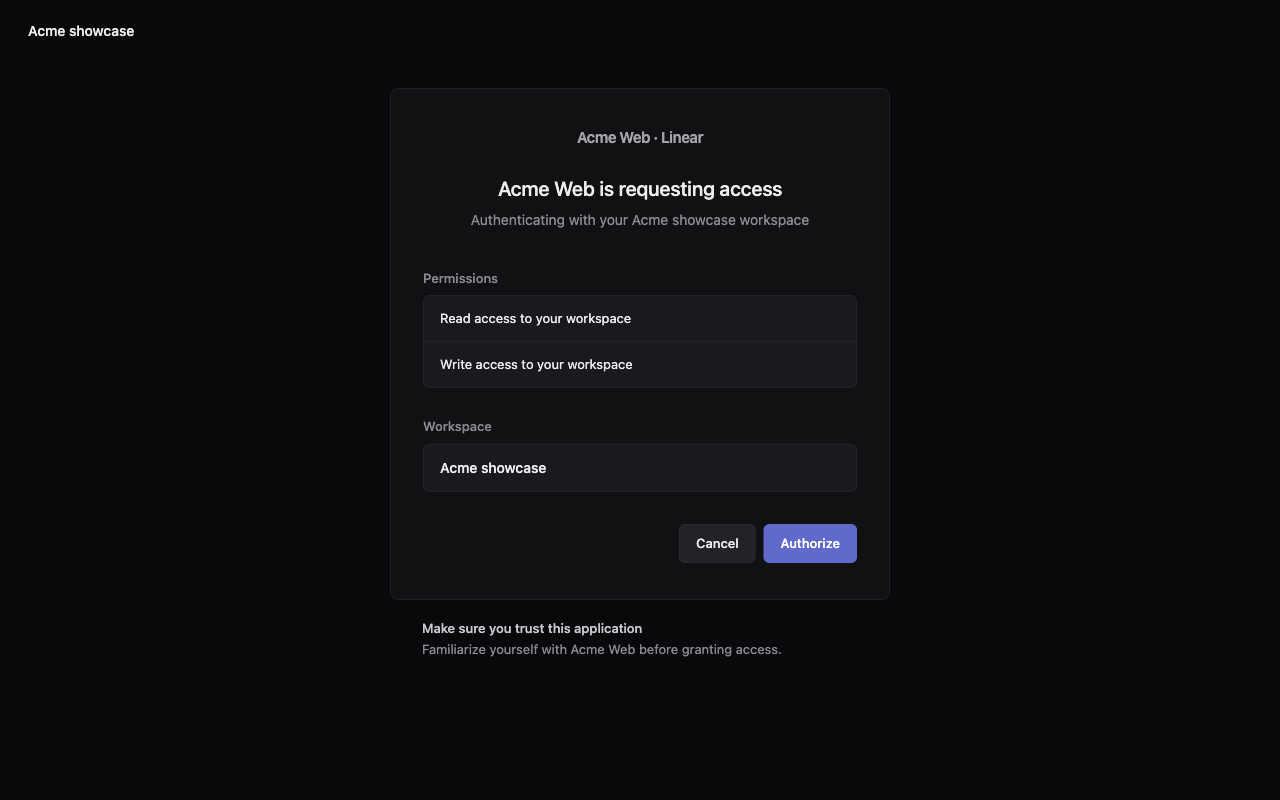
The example uses Linear 3.0.5. Keep its dependency pins when following it.
Setup gives the current installation instructions for @volter/twin-linear 3.0.5. Open the published README for credentials, seeds, supported operations and limits.
README shipped with @volter/twin-linear 3.0.5
These instructions were published with this package. Their tool versions may differ from the current starter cohort. Use Setup to install this version.
A Protocol 3 Linear twin for a workspace’s issue-filing integration and the Linear SDK installed by Twin (demand). It serves Linear’s GraphQL endpoint, OAuth authorization-code installation, token refresh and configured client-credentials grants, workspace/team/project discovery, workflow states, issue creation/update/archive, labels and comments. The customer life and published-example journey define the modeled scope (decisions).
Resources are read back with declared GraphQL refresh queries, including archived issues. Mutation deployment uses the vendored schema to adopt the resource returned by Linear. Refresh-token retries preserve the returned pair during Linear’s documented 30-minute grace. The executor budget stays below the documented API-key request quota.
The World’s doors represent settings/UI actions Linear’s API does not expose:
POST /_twin/workspaces, POST /_twin/workspaces/{urlKey}/people,
POST /_twin/app-credentials and POST /_twin/api-keys. The local credential door
POST /_twin/local-credentials uses those same settings actions to make an idempotent synthetic
starter workspace/owner, issue its personal key and register a World OAuth client. It supplies
LINEAR_API_KEY, LINEAR_CLIENT_ID and LINEAR_CLIENT_SECRET; the personal key names a stored
owner and is retained across stop/resume. Teams and projects are created through the
vendor API. The authorize screen uses the registered callback and carries its state back.
The published relation, logical, date, label, comment, estimate and project-lead filters are served. Other GraphQL fields, private-team access management, webhook configuration, PKCE and OAuth revocation are outside this modeled scope and are refused. The SDK’s default viewer, team and issue selections are modeled for the official SDK 86.0.0's create/update/read flow in the installed customer entry. This does not claim every SDK method. No webhook subscription is made by this life; there is no invented webhook delivery. Release assessments are retained by the independent catalog.
Use with an existing app
Use Node 22.6 or newer.
Install the exact twin release and World CLI in your app's folder:
npm install --save-dev --save-exact @volter/world@3.0.147 @volter/twin-linear@3.0.5
./node_modules/.bin/volter world init --name my-app --twins linear --source linear=@volter/twin-linear
Review the selected vendor and generated bindings before starting. The World supplies synthetic credentials; keep your app's real SDK. Read this release's modeled scope below.
./node_modules/.bin/volter world up
./node_modules/.bin/volter world run -- npm test
./node_modules/.bin/volter world log
./node_modules/.bin/volter world down
Replace npm test with your app's usual command. down retains data, and a later up resumes it.
Use these installed executables from the same app folder; install there first if they are missing.
Bring an existing app explains multi-vendor selection and routing.
The app keeps its real @linear/sdk; the packaged customer entry pins 86.0.0.
The World's GET /twin describes identity, time, and the available doors.
The workspace door takes { "name": "Example", "urlKey": "example", "owner": { "name": "Ada", "email": "ada@example.invalid", "password": "example-password" } }.
The people door takes { "name", "email", "password" }; the key door takes { "email", "label" }.
The app door takes { "name", "redirect_uris": ["https://app.example/callback"] };
its optional client_credentials: { workspace: "example", teamIds: [...] } represents
the settings toggle and the app user’s configured team access. All credentials are synthetic.
Profiles, public-team settings, empty optional-feature state, issue relations and counts are stored
in their vendor response shapes and preserved by the declared refresh queries. isMe is resolved
for the current caller. Creator counts include archived issues; team counts exclude them unless
includeArchived: true is requested. The kernel maintains these counters on recorded writes.
The starter leaves cycles, triage, integrations, sharing and automation unconfigured. Its inactive
numeric settings, avatar colors, invitation hashes, app actor email addresses and branch naming are
explicitly synthetic choices where upstream documentation does not declare production defaults.
Mutations for those additional features remain outside scope; absent feature state does not claim
that their behavior is implemented.
Set up this release
The example uses Linear 3.0.5. Keep its dependency pins when following it.
For a complete example, follow Workplace agent handoff. It includes the application code and its own exact dependency pins.
Use Node 22.6 or newer. Install this exact starter cohort in your app folder:
npm install --save-dev --save-exact @volter/world@3.0.158 @volter/world-core@3.0.148 @volter/world-runtime@3.0.156 @volter/world-console@3.0.149 @volter/twin-linear@3.0.5In your app’s folder, initialize a World with this implementation:
./node_modules/.bin/volter world init --name my-app --twins linear --source linear=@volter/twin-linearReview the detected vendor and retain the generated bindings. The linear service’s source must select this version:
{
  "source": {
    "package": "@volter/twin-linear",
    "version": "3.0.5"
  }
}
This is the source field, not a complete config. Keep the installed version, lockfile and generated service source in agreement. Use the release README for throwaway SDK credentials, seeds and limits.
The assessment records its own earlier tool versions under Measurements. This setup uses the current starter cohort.
Run your app’s own test command inside the World:
./node_modules/.bin/volter world up
./node_modules/.bin/volter world run -- npm test
./node_modules/.bin/volter world log
./node_modules/.bin/volter world down
down stops compute and retains state.
Versions and implementations
| Package / version | Publisher | Status | First use |
|---|---|---|---|
| @volter/twin-linear3.0.5 | volter-ai | Selected default | Passed |
| @volter/twin-linear3.0.4 | volter-ai | live | Passed |
| @volter/twin-linear3.0.3 | volter-ai | live | Journey passed; fresh install not measured |
Evidence for 3.0.5
Installed first use · Passed
- Installed first use
- Passed
- Fresh app installation
- Verified
- Workflow scope
- Exact installed artifact; normal CLI initialization, unchanged SDK, result assertions and retained-state read-only resume where applicable
- Customer SDK versions
@linear/sdk@86.0.0- CLI, kernel and runtime versions
@volter/world@3.0.147·@volter/world-core@3.0.147·@volter/world-runtime@3.0.147- World clock
- {"mode":"wall"}
- Retained-state readback
- Verified
- Stopped compute
- Verified
- Customer journey failures
- 0
API coverage, replay and browser measurements
Counts describe the declared HTTP surface, not separate command tables or other protocols. Consult the release README for those workflows.
- Assessment scope
- packaged-customer-journey; in-process
- Declared HTTP surface
- 19 served · 537 gaps · 556 declared operations
- Exercised HTTP operation coverage
- Not measured
- Journey steps
- 41 answered / 45 steps
- Replay
- Equal across 2 runs
- Journey failures
- 0
- Browser target
- HTTP customer journey replay through Chromium at each request origin; authored HTTP headers and observed wire responses 153.0.8010.12
- HTTP operations exercised through Chromium
- Not measured
- Chromium journey replay
- Equal across 2 runs
- Browser response observation
- Transport observes status, headers and body, including redirects and Set-Cookie; these are not JavaScript-visible response claims
- Application-origin CORS coverage
- Not measured
- Native cookie-jar coverage
- Not measured
- DOM coverage
- Not measured
- Source code coverage
- Not measured
- State transition coverage
- Not measured
Conformance results
- decided: 0 failures · every served operation is decided with its demand; every demanded and every refreshed operation is served
- published: 0 failures · what a release publishes holds every unit: its manifest, its spec and its journeys
- cited: 0 failures · every vendor fact cited is recorded as a page that answered, each quote found on it
- refresh: 0 failures · every stored resource of a vendor-backed unit declares how it is read back, and a unit that sends events ingests the vendor's
- registered: 0 failures · a vendor-backed unit, lane or not, reaches the registered pack's state system
- allowance: 0 failures · a rate budget above the fallback rests on the vendor's documented allowance, cited in its manifest
- client: 0 failures · driven by the vendor's own client (its official SDK), served as a World runs it, the vendor's documented behaviour holds · 1 case(s) through the vendor's client
- life: 0 failures · the life walked over HTTP against the pack served as a World runs it, with its scenario: every check held
- standalone: 0 failures · served by its server.ts as a World runs it, the pack answers HTTP and the boot probe, and each declared socket upgrades
Publisher, admission and provenance
- Publisher
- volter-ai/twin-packs-open
- Source commit
- eb812d002a1759fb5dba6d96db298c516667bd7c
- Catalog record commit
- d3ca98f728f662a31b3a9d8210468a7d7e12b170
- Package integrity
sha512-HlsIXRfkgMGaCfdvtOD2Wpr5oLYZM99pg6bp6wjVv2WYw/EUHlaA/S8Km58y/IF8xEwJ0lBFuf7rEXvRjSUOWA==- Admission mode
- Trusted internal publisher · maintainer merge
- Catalog assessment
- Bundled report checksum verified
- Assessed at
- Not recorded
- Assessment input head
- 3ae776a08ba846bf50cebae4bfd54ee801bb3396
- Evidence
- Assessment and admission
Catalog snapshot · @volter/twin-catalog@0.2.62
- Source commit
2d891e44624083a0ee54c058f1a566f050f38f1e- Catalog digest
72cc7d129522aaa089c84552b9d0839ab4cb0924ee7bd56ab359f827cddaa258- Installer integrity
sha512-MelxBw6h8W8k67EMu7SlYXOPwg8Z0QVcpDNKEcMzB8gH4v0JfYK2vuL7WdXNY1epjPZqxyK/5pEvDCiRqU0nAA==